An order is ready to ship, but the case list includes several sizes, uneven quantities and different handling requirements. Knowing how many identical boxes fit on a pallet will not tell you how to build this shipment.
Mixed pallet planning starts with the whole order. The job is to account for every physical shipping case, arrange the cases within the pallet limits, and give the warehouse a build it can review and follow. Here is how to prepare the inputs, inspect a proposed arrangement and communicate the result.
What is a mixed SKU pallet?
A mixed SKU pallet carries cases of more than one stock-keeping unit. Those cases may differ in dimensions, weight, quantity or handling requirements. Multiple SKUs can also use the same case size: product variety and geometric variety are different things.
Rotating identical cases within a single-SKU pallet pattern does not make it mixed-SKU planning. The latter must decide which cases from the order belong on which pallets, not simply repeat one case size.
“Mixed-case palletizing” describes building pallets from different shipping cases. It does not necessarily mean mixing products inside a case. A “rainbow pallet” can have a narrower meaning: Plus One Robotics uses the term for homogeneous product layers. When a receiver requests rainbow pallets, confirm whether each layer must contain one SKU rather than assuming any mixed arrangement qualifies.
Why cubic volume and TI × HI are not enough
Total case volume is useful. Add each case’s outside length × width × height × quantity to understand the order’s scale. Comparing that total with the available pallet cube provides a theoretical starting point.
It does not prove that the cases fit. A narrow gap might have enough volume for a remaining case but insufficient width. Turning an upright-only case onto its side may solve a geometric problem while violating the handling requirement.
Mixed heights also change what can sit above what. Space above a shorter case is not automatically usable support for a larger case. Weight can become the limiting factor before the available height is filled.
TI and HI describe cases per layer and layers per pallet. Their product gives the count for identical full layers, but one TI × HI number cannot describe a heterogeneous order’s case identities, varying heights and placements. Keep volume arithmetic as a screening check, then review an actual arrangement.
Prepare the case list and pallet limits
Before calculating, work through these input checks.
Measure the packed case. Record outside length, width and height after filling and closing it. Do not substitute product dimensions or the box supplier’s inside dimensions. Include bulges and protrusions in the measured envelope. The guide to inside versus outside box dimensions explains why these measurements serve different purposes.
Resolve cases versus product units. “Quantity 120” is ambiguous without a unit. At 12 products per full case, 120 products means 10 cases. An order for 125 products means 10 full cases plus a partial case containing five products, assuming that is your packing policy. Record the actual partial case dimensions and weight; fewer contents do not necessarily mean a smaller box.
Record known packed-case weights. Include the contents and case packaging. Distinguish measured values from estimates. A missing weight is unknown, not zero.
Confirm the pallet and load envelope. Record footprint, pallet height, tare, maximum loaded height and gross-weight limit. Loaded height includes the pallet; gross weight includes pallet tare. Check the receiver’s requirements and equipment limits instead of treating a familiar pallet size as a universal capacity rating.
Translate handling instructions into explicit rules. Identify upright-only cases, cases with nothing allowed on top, and cases that must sit directly on the pallet floor. These are placement requirements. They do not establish compression strength or automatically classify fragile products.
An illustrative mixed-order case list
The following fictional order shows how to prepare consistent inputs. It is not a tested shipping configuration. All dimensions are packed-case outside dimensions in millimeters; weights are kilograms per packed case.
| Fictional SKU and product | Cases | Products per case | Outside L × W × H (mm) | Weight per case (kg) | Handling rules |
|---|---|---|---|---|---|
| A10: Cable kits | 24 | 12 | 400 × 300 × 250 | 8.0 | Upright only |
| B20: Foam insert packs | 18 | 24 | 600 × 400 × 300 | 5.0 | Upright only |
| C30: Mounting kits | 8 | 6 | 400 × 300 × 200 | 14.0 | Upright only; directly on pallet floor |
| D40: Instrument housings | 6 | 4 | 500 × 350 × 300 | 6.0 | Upright only; nothing on top |
Scroll to compare all columns.
For this example, assume a 1,200 × 1,000 mm pallet, 150 mm pallet height, 25 kg tare, 1,500 mm maximum loaded height and 750 kg gross-weight limit per pallet. These are illustrative planning inputs, not specifications for every pallet of this size.
The list contains 56 physical cases, 792 products and 430 kg of packed cases before pallet tare. These are arithmetic checks on the input list, not a calculated pallet allocation.
In a proposed plan, reconcile every SKU against that list. Confirm that all eight mounting-kit cases sit on the pallet floor and nothing is placed above the instrument-housing cases. Review each pallet’s height and mass separately. An acceptable order total does not establish that every individual pallet meets its limits.
Inspect where upper cases meet the cases beneath them, along with gaps and uneven surfaces. A visually compact arrangement is not, by itself, an acceptable warehouse build.
PackCalc calculated this fictional order locally on October 3, 2026, producing a complete three-pallet plan. Its placement validator independently checked the result. This is one recorded result, not proof of the minimum possible pallet count or shipping suitability.
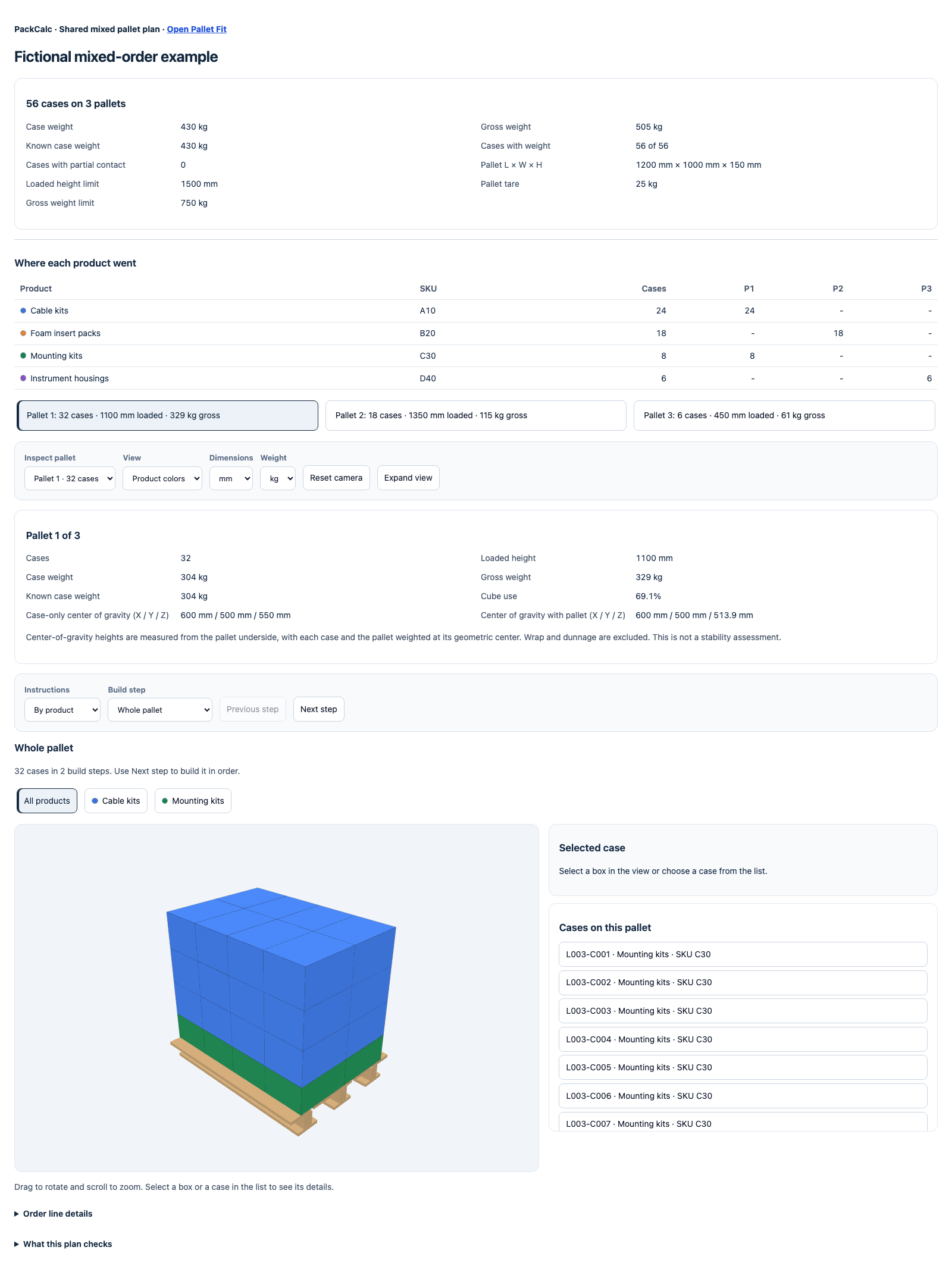
Turn the order into a recorded build plan
PackCalc Mixed SKU Pallet Planner arranges rectangular physical shipping cases across multiple pallets. Its workflow follows the same order as the preparation and review above.
Enter or import the complete order
Enter rows manually, paste spreadsheet rows, import CSV or reuse saved shippers. Confirm units and quantities before calculating. Dimensions support mm, cm, inches and feet; weights support kg and lb.
Quantity can be entered as cases or product units. A full-pack size can resolve full and partial cases, but it does not redesign the shipping case. An automatically created partial case keeps the full case’s outside dimensions. If a partial uses a different box size, enter it as a separate case row with its actual dimensions and packed weight. Check that the resulting physical cases match what the warehouse will actually pack.
Set pallet limits and handling rules
Choose the pallet footprint, verify its height and tare, and enter the loaded-height and gross-weight limits. Presets include 48 × 40 inch GMA, 1,200 × 800 mm EUR, 1,200 × 1,000 mm UK/ISO and 1,100 × 1,100 mm pallets; custom footprints are also supported.
Apply the relevant handling rules to each case type. Do not loosen a genuine shipping requirement merely to obtain a more compact arrangement.
Calculate, then inspect every pallet
The planner searches for a complete arrangement using fewer pallets. Its bounded search does not guarantee the mathematically minimum pallet count. Some orders will not produce a complete plan within the search limits; that is not proof that no arrangement exists. Check units, case dimensions and conflicting rules before changing any genuinely required limits.
When a complete plan is found, review allocation, case and product counts, orientations, heights, mass qualifications and applicable checks. Use the interactive 3D inspection and build steps to examine each pallet, not just the summary.
Geometric support does not mean every case has 100% bottom support. A gross-weight limit requires pallet tare and all required case weights before calculation. Without a gross limit, geometric planning can proceed with unknown weights, but the result is not verified as weight-compliant. Resolve those uncertainties before releasing the build.
Save, export and share the reviewed plan
Save the plan and use the PDF build plan or a read-only share link for the warehouse handoff. Link recipients can open the shared plan without an account.
Pro/Team access also includes a packing-list CSV showing allocation and quantities. This output is separate from CSV input: it is not a coordinate file, robot program or WMS/ERP integration.
As a warehouse practice, identify the order and plan revision in your handoff. Pair the recorded arrangement with your separately approved handling and restraint instructions. When cases or quantities change, review and redistribute the plan rather than relying on an old PDF.
Try it with your dimensions
Plan your mixed order in PackCalc
Create a reviewable pallet build from your case list. A free account is required. Use a desktop or laptop at least 1280 pixels wide.
Open calculatorAvoid confusing a fit check with shipment approval
The most consequential mistakes are often input mistakes: using inside dimensions, counting products as cases, overlooking a partial case, or omitting pallet height and tare. Reconcile the physical shipment against the input list before debating the arrangement.
Next, separate three practical questions.
Can the packaging carry the loads? Review case strength, the loading imposed by cases above, actual support and pallet condition. Placement on a modeled pallet floor does not verify compatibility with real deck-board gaps. FedEx’s pallet guidance discusses pallet construction, top-board spacing to avoid forklift blade impacts, and stacking methods.
Will the load remain secure? Packing cases into the available space does not establish stretch-wrap adequacy or transport stability. The UK DVSA’s guidance for palletized loads distinguishes securing goods to the pallet from securing the palletized load to the vehicle. These require separate review for the actual shipment.
Can the warehouse build and handle it? Review placement access, lifting tasks, equipment clearance, required label visibility and any receiving restrictions. For U.S. workplaces, OSHA’s materials-handling requirements address aisle and doorway clearances, and stored stacks secured against sliding or collapse.
PackCalc’s mixed-case arrangement is geometric planning, not compression assessment, transport-stability validation or shipping certification. It does not guarantee a level top, gap-free loading or crush prevention. A geometrically complete plan still needs operational review. Check the finished shipment again after adding protective materials and restraint.
When to use a single-SKU calculator instead
Use the single-SKU pallet calculator when the task is to compare arrangements of one identical shipping-case type, establish cases per pallet or document a repeating pattern.
Use mixed-order planning when you need to allocate specified quantities across pallets and preserve their identities and handling rules. Even equally sized cases may need that order-level accounting. The deciding question is not merely “Are the boxes different?” but “Do I need a plan for this complete order?”
Frequently asked questions
Can a mixed SKU pallet calculator handle different case sizes?
Yes. PackCalc’s Mixed SKU Pallet Planner accepts rectangular shipping cases with different dimensions, quantities and handling rules. A complete arrangement is not guaranteed for every order.
Can I start with a spreadsheet or CSV?
Yes. Paste spreadsheet rows or import a CSV, then check dimensions, units, quantities and rules. Importing a CSV is different from exporting the Pro/Team packing-list CSV.
Does it check pallet weight limits?
Yes, when a gross-weight limit is set, the planner requires pallet tare and all required case weights before calculation. Without a gross limit, weights can remain unknown, so the geometric plan cannot be described as verified weight-compliant.
Is the Mixed SKU Pallet Planner free?
A free account includes a weekly allowance, watermarked PDF build plans and sharing. Pro/Team access also has weekly limits. Check current plans and access for allowances and export options.
Can warehouse colleagues open a shared plan without accounts?
Yes. Read-only share links can be opened without an account. The person calculating the plan needs an account; recipients can also receive the PDF build plan.
Does a completed plan mean the load is stable for shipping?
No. Geometric fit and support checks do not validate compression strength, containment or transport stability. Review the proposed build against your packaging, handling and shipping requirements.
Start with the cases you will actually ship, confirm the limits, and review every pallet before the warehouse build.
Try it with your dimensions
Turn your case list into a build plan
Plan your mixed order, inspect each pallet and share the recorded result. A free account is required.
Open calculator